Digital Business Card: Everything You Need to Know
What a digital business card is, how QR code and NFC sharing work, what it costs, and how to create yours in minutes, for free. From the team behind ClickCard, used by 200,000+ professionals.
Free forever plan. No credit card required.

The short answer
A digital business card is an electronic version of a paper business card that you share by QR code, NFC tap, link, or email. It holds your contact details, social profiles, and links, can be updated anytime without reprinting, and lets the people you meet save your details straight to their phone, no app required.
Key takeaways
- You can start free: ClickCard's Basic plan includes 2 cards and never expires.
- Share it by QR code, NFC tap, link or email, and with Pro, from Apple Wallet or Google Wallet.
- The person you meet needs no app: your card opens in their browser.
- Change a detail once and every QR code, NFC card and link you have shared shows it.
What is a digital business card?
A digital business card (also called a virtual or electronic business card) stores your professional identity as a live profile instead of on printed paper: name, title, company, phone, email, website, and social links. When you meet someone, they scan your QR code or tap your NFC card, and your details open instantly in their browser, ready to be saved to their contacts.
Unlike paper cards, a digital card is dynamic. Change jobs, update your phone number, or add a new portfolio link, and every card you have ever shared shows the change. It also does things paper physically cannot: it opens your booking link, connects to your profiles on 30+ social networks and apps, and collects the details of the people you meet through a lead form.
Digital business cards went mainstream after 2020, when contactless networking became the norm, and the market keeps growing: Allied Market Research valued the global digital business card market at $159.4 million in 2022 and projects it to more than triple to $505.2 million by 2032. Today they are standard at conferences, sales meetings, and trade shows, anywhere professionals exchange contact information.
What a digital business card is not
A vCard file
A .vcf file is a snapshot of your details. It goes stale the moment one of them changes.
A static QR code
A code from a generic generator encodes fixed text that can never be edited.
A LinkedIn profile
It lives inside a closed network, styled by LinkedIn and often behind a login.
A digital business card combines the strengths of all three: saveable like a vCard, scannable like a QR code, always current like a social profile, and fully yours, with your own branding and no account needed by the person receiving it. For the terms behind it, from NFC to vCard, see our digital networking glossary.
How does a digital business card work?
Your card lives in an app or web profile with its own link. You share it in four main ways, and the person receiving it never needs to install anything.
QR code
Show your QR code and the other person scans it with their phone camera. ClickCard gives each card two: one opens your card page, the other adds your contact details directly. See how each one works.
NFC tap
An NFC card holds your card's link. Tap it on a modern smartphone and your card appears on their screen, with nothing to scan. How NFC cards work.
Link, PDF and image
Every card has its own link for email signatures, video calls and proposals, or to send on LinkedIn and WhatsApp. You can also share it as a PDF or an image.
Apple Wallet and Google Wallet
With Pro, add your card to Apple Wallet or Google Wallet and show your QR code straight from your lock screen, even offline.
Sharing also works both ways. When someone opens your card, they can send you their own details through its lead form, so you walk away with a lead, not just the hope that they will call. And when someone hands you a paper card, ClickCard's AI business card scanner turns it into a saved contact in seconds. Explore everything ClickCard can do.
What types of digital business cards exist?
Every digital business card shares the same core idea, a live and shareable contact profile, but they differ in how they are shared and what they cost.
| Type | How it is shared | Best for | Typical cost |
|---|---|---|---|
| App-based card | QR code, link, email, social media | Everyday networking and remote work | Free |
| NFC card or tag | A physical card you tap on a phone | Conferences, sales teams, frequent in-person events | One-time card purchase |
| Wallet card | Apple Wallet or Google Wallet pass | Quick access at events, offline sharing | Free or paid, depending on the app (Pro on ClickCard) |
| Email signature card | A link or QR code in every email you send | Client-facing roles and account managers | Free |
QR code or NFC card: which should you use?
Every digital business card can be shared both ways. The QR code is created with your card and lives on your phone; the NFC card is a physical card you tap on the other person's phone. Both open the same live profile. They just shine in different moments.
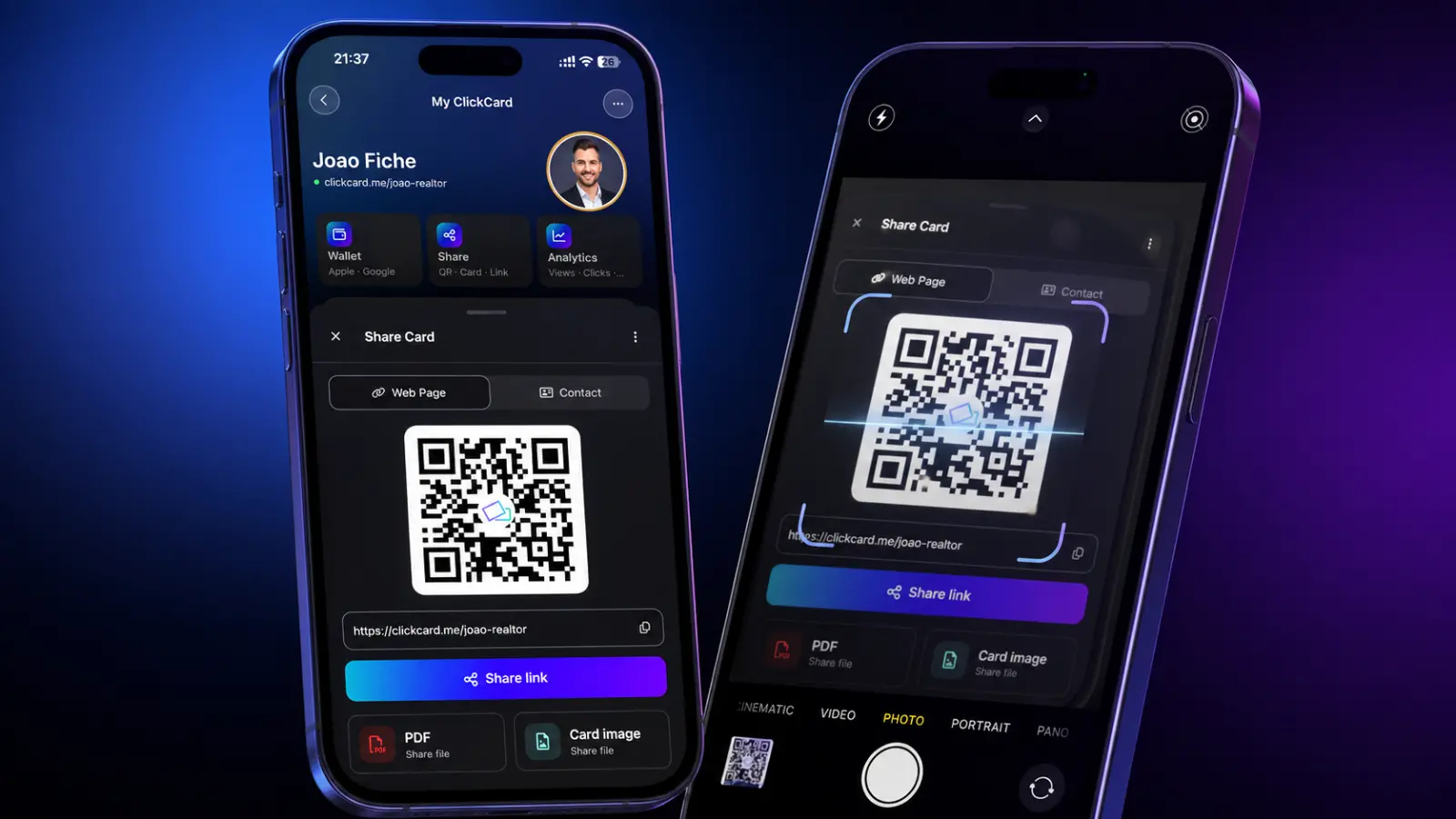
When the QR code wins
- Free: it is created automatically with your card
- Works with virtually any smartphone camera
- Can be shown on screen, in slides, on flyers and in email signatures
- The natural choice for video calls and remote networking
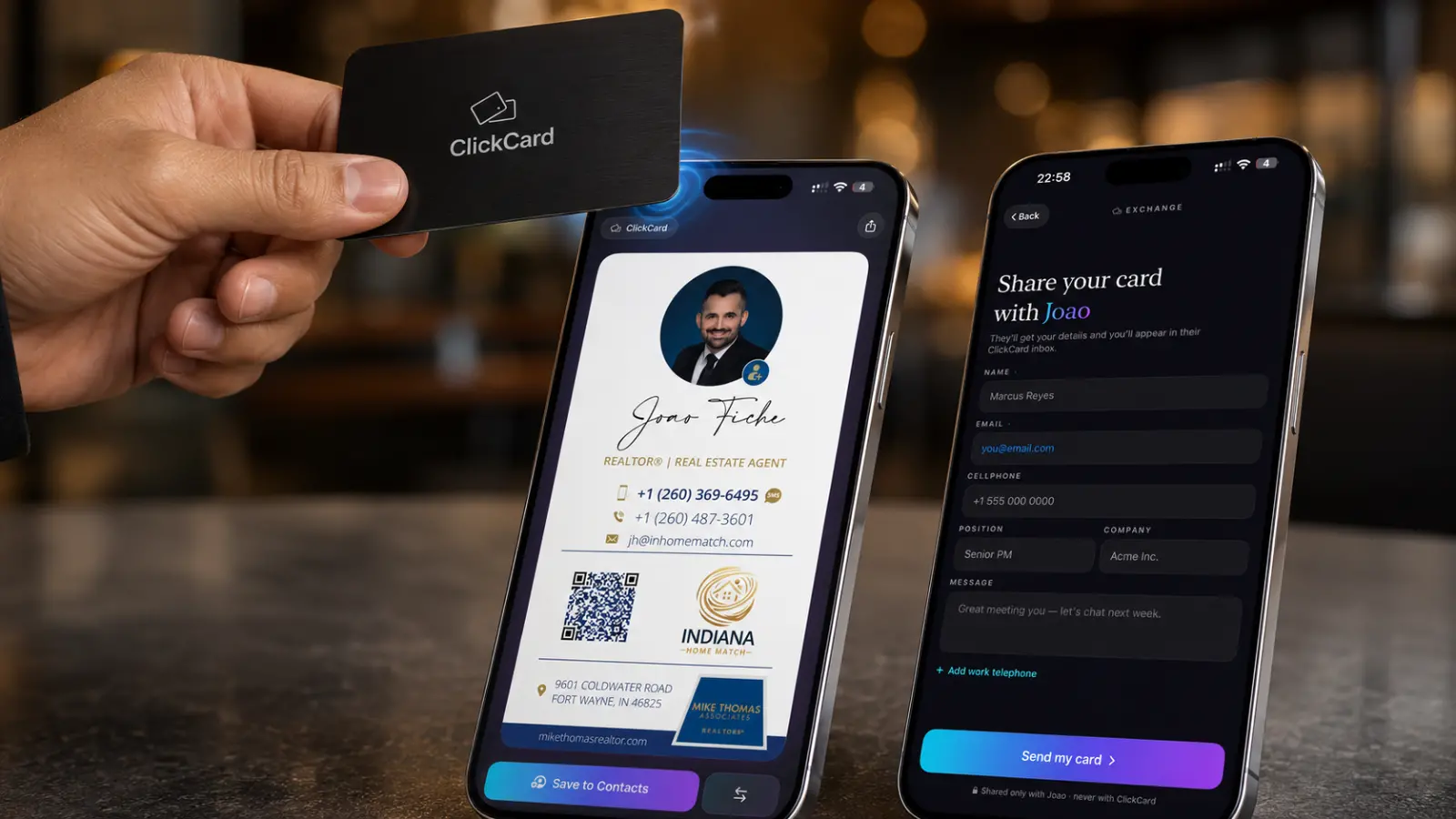
When the NFC card wins
- The fastest share in person: one tap and your card is on their screen
- Feels premium and memorable, a real conversation starter
- No focusing a camera in a dark or crowded venue
- Works even when your own phone battery is dead
You do not have to choose. Most professionals show the QR code by default and carry an NFC card for conferences and important meetings. Both point to your live profile, so they always stay in sync: update your details once and every QR code and NFC card you own is current.
Read the full NFC vs QR code business card comparison, or see how business cards with QR codes work.
How do you create a digital business card?
Creating a digital business card takes about five minutes. Here is how it works with ClickCard, with no design skills needed.
Create your free account
Sign up on the ClickCard web app in your browser, with nothing to install, or get the free app for iPhone or Android. The free plan covers a complete professional card.
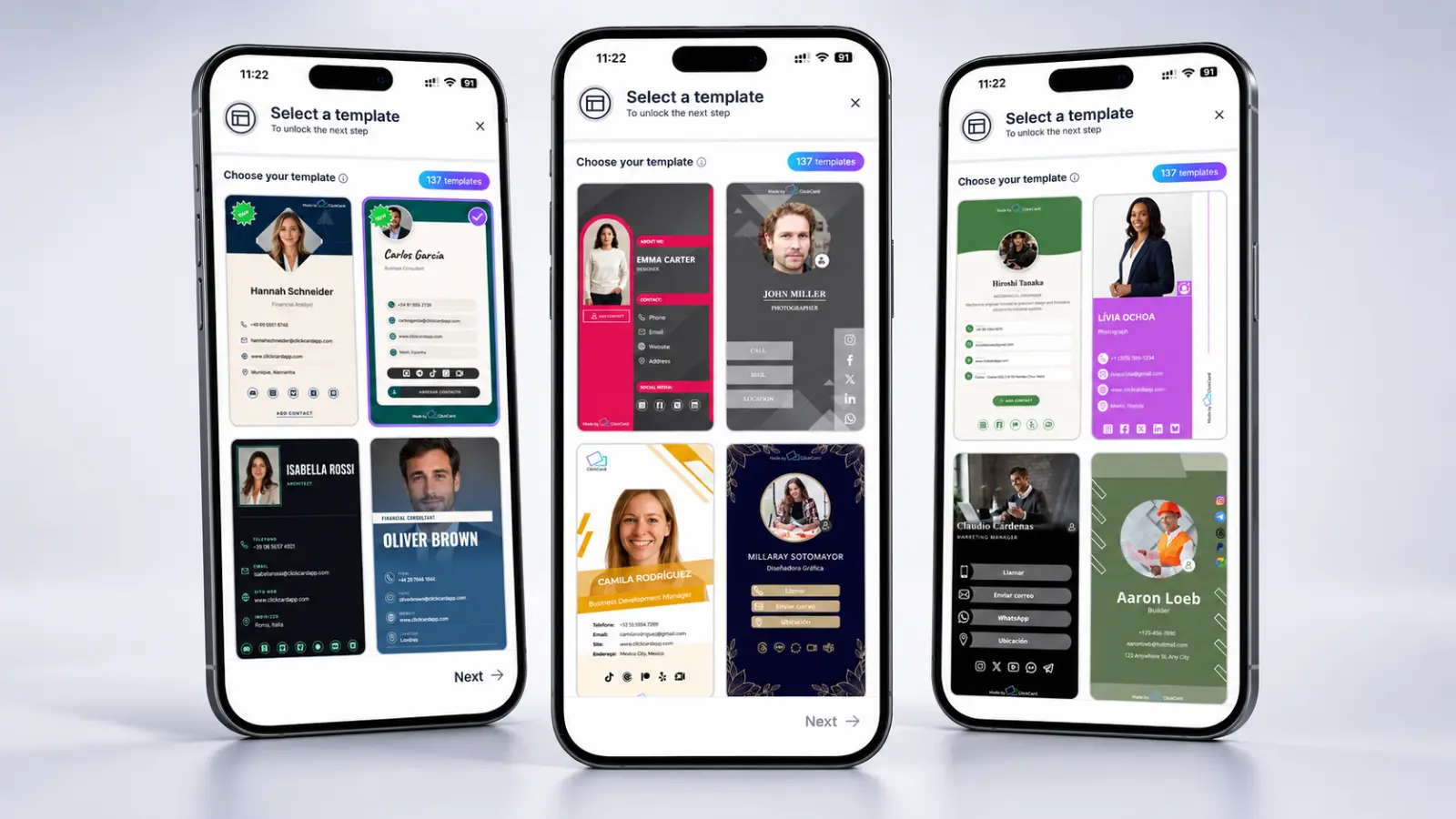
Pick a template
Choose one of the professionally designed templates, adjust its colors, and add your photo and company logo.
Add your details
Enter your name, title, company, phone, email, website and social profiles. A photo or logo helps people remember who they met.
Share it your way
Show your QR code, tap your NFC card or send your link. With Pro, you can also add the card to Apple Wallet or Google Wallet.
Follow up
Get a notification when someone sends you their details through your card. With Pro, see how many people viewed your card and which links they tapped.
Giving cards to a whole team? With ClickCard Enterprise, our team designs your company templates with you.
Want every detail? Follow the step-by-step guide to creating a digital business card, or see how the ClickCard web app works in your browser.
What should you put on your digital business card?
A digital card can hold far more than paper ever could, which makes restraint part of good design. Start with the essentials every professional card needs.
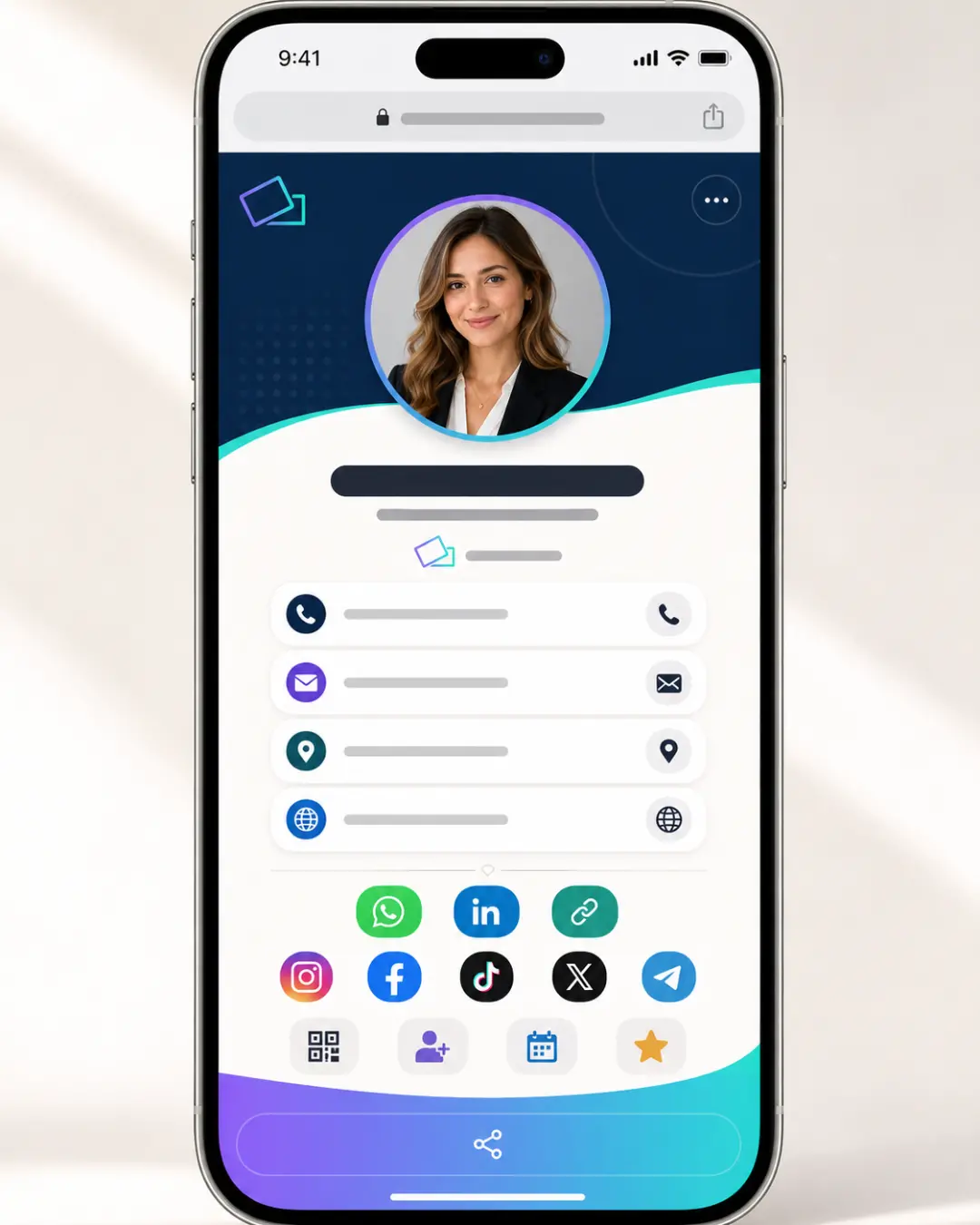
- Your full name and a recent, professional photo
- Job title and company, with the company logo
- Phone number with one-tap call and WhatsApp buttons
- Email address and website
- LinkedIn, plus the one or two social profiles that matter in your field
- A save-contact button, the single most important element
- One clear call to action: a booking link, portfolio or quote request
- Your brand colors, so the card looks unmistakably like your business
Then stop. A card with fifteen links buries the one action you actually want people to take. Decide what a new contact should do next (save your number, book a call, view a listing) and design the card so that action is impossible to miss.
Why switch from paper to digital business cards?
88% of paper business cards are thrown away within a week of being handed out, according to Adobe, taking your contact details with them. Digital cards fix the three biggest problems with paper: they cannot run out, they never go out of date, and they are measurable. They are also the greener choice: peer-reviewed life-cycle research found that at realistic large-scale use, digital business cards have a lower environmental footprint than paper ones.
88%
of paper business cards are thrown away within a week
Source: Adobe
3×
projected market growth by 2032, from $159M to $505M
Source: Allied Market Research
$0
per share, versus about 6 to 40 cents for every printed card
Never run out
Share your card as often as you like, straight from your phone.
Always up to date
Change a detail once and every card you have shared shows it, with no reprinting.
Saved, not lost
People save your contact to their phone instead of leaving it in a drawer.
Leads, not just contacts
The lead form on your card lets people send you their details in return.
Measurable
With Pro, see how many people view your card and which links they tap.
Less paper
No print runs and no boxes of outdated cards, for a smaller footprint.
See the full digital vs paper business card comparison, calculate your environmental savings, or read 10 reasons to switch to digital business cards.
How much does a digital business card cost?
A complete digital business card is free. ClickCard's free plan includes 2 cards, unlimited sharing by QR code and link, and a lead form, with no trial period and no time limit. Compare that with paper: an order of 500 printed cards runs from about $30 at budget printers to $200+ for premium stock and finishes, and needs reordering every time your details change.
The Pro plan costs $4.99 a month, or $47.99 a year (under $4 a month), and adds up to 10 cards, all 137+ templates, a custom link, Wallet passes and card analytics. Enterprise adds an admin dashboard, company templates and single sign-on for organizations that give cards to whole teams. Physical NFC cards are optional and work on any plan.
Paper cards
$30 to $200+
For 500 cards, reprinted whenever a detail changes
Basic
Free
2 cards, unlimited QR code and link sharing, and a lead form
Pro
$4.99/mo
Or $47.99 a year: up to 10 cards, every template, Wallet passes and analytics
Enterprise
Custom
An admin dashboard, company templates and single sign-on
Are digital business cards secure and private?
A digital business card only ever shows what you choose to publish on it, and unlike paper, you stay in control after you share it.
How we handle personal data is public: read the ClickCard privacy policy, or see how Enterprise keeps company data secure.
You decide what is shown
Remove a phone number, swap a link or take the card down, and every QR code, NFC card and link you have shared shows the change at once. Contacts people already saved, and PDFs or images you sent, keep the details they had.
No sign-up to view it
Your card loads over an encrypted HTTPS connection, and the person receiving it never has to create an account or hand over personal data to view it and save your details.
Visitors stay anonymous
ClickCard's analytics count visits without identifying visitors. People are only identified when they choose to leave their details.
Control for companies
When an employee leaves, an admin removes them in one place: their cards come down, and their card link can send visitors to the company website. Printed cards would keep advertising an outdated identity for years.
Digital business cards for teams and enterprises
For an organization, business cards are a brand asset, and paper makes them impossible to govern. Every reorder risks typos and outdated logos, every promotion makes a box of cards worthless, and nobody can say whether the spend produced a single lead. A digital business card platform replaces all of that with one dashboard.
With ClickCard Enterprise, our team designs your company templates with you, cards can be created for everyone at once, and company details set on the template stay consistent, while admins can also lock names and job titles. When someone joins, their card can be ready on day one; when someone leaves, an admin removes it from the dashboard.
One admin dashboard
Add people from a spreadsheet or through single sign-on, and manage every card in one place.
Locked to your brand
Company templates in your design, colors and logo, with one for each office or department.
Company analytics
Views, visitors, saved contacts and leads across the company, with a ranking of your top networkers.
Contacts ready for your CRM
Paper cards your team scans land in one list, ready to export as CSV.
Explore ClickCard for enterprises, or read about the benefits of digital business cards for the whole company.
Which digital business card app is best?
The best digital business card app depends on what you need. Solo professionals should look for a generous free plan and easy sharing, while teams need central management, brand control and analytics. The main platforms (ClickCard, Popl, Blinq, HiHello, Linq and Mobilo) all cover the basics; they differ on price, team features and how people experience your card.
ClickCard combines a free-forever plan, QR code, NFC and Wallet sharing, AI card scanning and Enterprise team management, with Pro at $4.99 a month or $47.99 a year. We keep detailed comparisons with each major alternative, so you can decide for yourself.
- ClickCard vs Popl
- ClickCard vs HiHello
- ClickCard vs Blinq
- ClickCard vs Linq
- ClickCard vs Mobilo
- All comparisons
Weighing more options? Read our roundup of the best digital business card apps.
How do you share a digital business card politely?
Digital cards are standard at events now, but a smooth handoff still sets you apart. Five habits of people who network well:
Lead with the person, not the tech
Say "let me share my card" and hold up your QR code. Do not explain how NFC works. The technology should be invisible; the conversation is the point.
Have it ready before you need it
Open your QR code before you walk over, or keep it one tap away with the home-screen widget or a Wallet pass (both Pro). Fumbling through apps mid-handshake undoes the organized impression you were about to make.
Ask for their details back
After they scan, invite them to fill in the lead form on your card, or scan their paper card with the app. A one-way handoff is a lost lead.
Follow up within 24 hours
Send a short message that references your conversation while they still remember your face. With Pro, your card analytics show how many people viewed your card and which links they tapped.
Respect the paper holdouts
Some contacts will still hand you paper. Accept it graciously, scan it into your contacts, and let a prompt, personal follow-up make the case for digital better than any pitch could.
Digital business cards by industry
How you use a digital card depends on your work: a realtor shares listings, a sales rep captures leads at trade shows, a consultant puts a booking link up front. Explore the guide for your field.
Real estate
Put your listings and contact buttons on the card you share at every showing and open house.
Sales teams
Swap details in seconds at trade shows and keep every lead in one place.
Consulting
Lead with your expertise and a booking link, so the next meeting is one tap away.
Healthcare
Share your practice, locations and appointment link without handing out paper.
Finance
Keep your credentials and contact details current after every client meeting.
Trusted by professionals worldwide
Over 200,000 professionals and 500+ companies in 50+ countries use ClickCard to share their details and capture leads. Here is what they say in the app stores.
- Professionals
- 200K+
- Companies
- 500+
- Countries
- 50+
- Templates
- 137+
“The app is very good, it offers practical functionality with great features. It's easy to use and especially easy to promote. I highly recommend it.”
“I loved the app; it's very easy and useful to use. Any phone can receive my card without needing any additional software installed. I highly recommend it!”
“Excellent app, simple and easy to use, it meets the needs and objectives for which I downloaded it. Highly recommended.”
“Super good app! Easy to use and very fast.”
“Really good and practical app! Highly recommended.”
“Pleasant and easy to use, contributing to environmental care, highly recommended!”
“This is a great app. It allows me to keep everything organized and more efficient.”
“An absurd number of layout and social media options, not to mention the various functionalities. Perfect app.”
“A very useful and complete app! Recommended.”
“Very easy, intuitive, and effective. I recommend it!”
“I loved it! Super practical! Variety of models and very complete for adding data!”
“I love this app, it's super easy to use, it's an excellent product. I highly recommend it.”
“I love it! Just what I was looking for, very useful.”
“This app has very good options for a digital business card!”
“Excellent app, very easy to use. The QR code works perfectly. 100% recommended.”
“Excellent! It helps me tremendously to reach more clients with just one click. I love it! 100% recommended!”
“Easy and practical. Best app in its category.”
“Excellent solution!”
“Excellent app.”
Go deeper on digital business cards
- Step by step
How to create a digital business card in 5 minutes
- Apps
The 8 best digital business card apps in 2026
- Comparison
NFC vs QR code business cards: which one should you use?
- Networking
Online business cards: how to modernize your networking
- Guide
Interactive digital business cards: benefits, cost and how to get one
- Entrepreneurs
Digital business card for entrepreneurs: 8 key benefits
- Web app
Create your digital business card right in your browser
- Teams
The benefits of digital business cards for the whole company
Digital business card FAQ
Quick answers to the most common questions about digital business cards.
Still have questions?
Do recipients need an app to receive my digital business card?
No. When someone scans your QR code or taps your NFC card, your card opens in their phone's web browser. They can save your contact details directly to their address book without installing anything.
What is the difference between an NFC card and a QR code card?
Both share the same digital profile. A QR code is displayed on your phone screen and scanned with a camera, while an NFC card is a physical card that transmits your profile with a tap. QR works on virtually every smartphone; NFC feels more premium and is faster at in-person events. Most professionals use both.
Can I add my digital business card to Apple Wallet or Google Wallet?
Yes, with ClickCard Pro. Your card can be saved to Apple Wallet and Google Wallet, so you can show your QR code straight from your lock screen, even offline.
Is a digital business card free?
Yes. ClickCard's free plan includes 2 complete cards with unlimited sharing by QR code and link, and a lead form. Pro features like analytics, a custom link and Wallet passes cost $4.99 a month, or $47.99 a year, and physical NFC cards work on any plan.
Are digital business cards professional?
Yes. They are now standard at conferences and trade shows. A well-designed digital card with your logo, brand colors, and photo typically makes a stronger impression than paper, and recipients keep your details instead of losing them.
Can my whole team use digital business cards?
Yes. With ClickCard Enterprise, every employee gets a card made from your company's templates, admins manage all of them from one dashboard, and company analytics show what the team's cards bring in.
What should a digital business card include?
At minimum: your name, title, company, phone, and email. The best cards also add a photo or logo, your website, social profiles like LinkedIn, and one clear call to action: a booking link, portfolio, or WhatsApp button.
How do I share my digital business card on LinkedIn or WhatsApp?
Every ClickCard has a unique link. Copy it from the app and paste it into your LinkedIn profile, WhatsApp messages, email signature, or anywhere else you connect with people.
Can I update my digital business card after I have shared it?
Yes. This is the core advantage over paper. Your card is a live profile: change your phone number, title, or links and everyone who has your card sees the updated version immediately. Existing QR codes and NFC cards keep working, because they point to the same live link.
Do digital business cards work without an internet connection?
On your side, yes. With Pro, your QR code opens from Apple Wallet or Google Wallet without a connection, and an NFC card needs no power or data at all. The recipient's phone uses its own connection to load your profile, and if they are offline too, the link simply opens the next time they are connected.
Can I convert the paper cards I receive into digital contacts?
Yes. The ClickCard app for iPhone and Android includes an AI business card scanner: photograph a paper card and the app reads the name, company, phone and email and saves them as a contact, so the cards you collect at an event stop disappearing into drawers.
Do digital business cards work internationally?
Yes. A digital card is a web link, so it opens in any country, and QR scanning and NFC tapping work the same on smartphones worldwide. ClickCard runs local operations in the United States, Brazil, and Chile, and cards are shared across borders every day.
Create your digital business card today
Join 200,000+ professionals who network smarter with ClickCard. Free to start, ready in minutes.


Prefer the app? Get it on iOS and Android.
- 01 Free plan
- 02 AI card scanner
- 03 Lead forms